On July 4th, 2012, Phantasy Star Online 2 will sell the following items and costumes either through Scratch or directly through the AC Shop. The current list of Arks Cash content is listed on the PSO2 Catalog site. Since there's too many to list in one blog post, this post will only highlight the more interesting content.
The AC Scratch is separated into two Gachas, the cheaper option contains boost items, costumes, hairstyles and additional voices. The AC Scratch GOLD only contains costumes.
AC Scratch: 200 AC
AC Scratch GOLD: 500 AC
New Costumes!
アングリフ・ボディ Angriff Body アングリフ・アーム Angriff Arm アングリフ・レッグ Angriff Leg アングリフ・ヘッド Angriff Head
ウェディングドレス Wedding Dress Comes in Pink and White
セレモニータキシード Ceremony Tuxedo Comes in Pink and White.
アドヴェントス Adventos
イオニア・ボディ Ionia Body イオニア・アーム Ionia Arm イオニア・レッグ Ionia Leg イオニア・ヘッド Ionia Head
バリスティックコート Ballistic Coat
The rest of the costumes are recolors of existing default costumes. These costumes can be obtained in the AC Scratch and AC Scratch GOLD.
Hairstyles and Accessories
ふんわりアフロ Fluffy Afro
モヒカン Mohican (Mohawk)
中分けショートボブ Parted Short Pop
たれきつね耳 Hanging Fox Ears きつね耳 Fox Ears ウェディングコサージュ Wedding Corsage
女性追加ボイス06 Additional Female Voice 06 by Yōko Hikasa
女性追加ボイス03 Additional Female Voice 03 by Yoshiko Sakakibara
男性追加ボイス07 Additional Male Voice 07 by Ryōhei Kimura
男性追加ボイス03 Additional Male Voice 03 by Yōsuke Akimoto
女性C追加ボイス06 Additional Female Cast Voice 06 by Yōko Hikasa
女性C追加ボイス03 Additional Female Cast Voice 03 By Yoshiko Sakakibara
男性C追加ボイス07 Additional Male Cast Voice 07 by Ryōhei Kimura
男性C追加ボイス03 Additional Male Cast Voice 03 by Yōsuke Akimoto
追加ロビーアクション19 Additional Lobby Action 19 Drunkard
追加ロビーアクション26 Additional Lobby Action 26 Dance 3
Arks Cash List
プレミアムセット30日 Premium Set 30 days | 1300 AC
プレミアムセット60日 Premium Set 60 days | 2500 AC
プレミアムセット90日 Premium Set 90 Days | 3600 AC
マイルーム利用30日 My Room 30 Days Use | 700 AC
マイショップ出店30日 My Shop 30 Days Use | 700 AC
拡張倉庫(#)利用30日 Expanded Storage 30 Days | 500 AC
拡張倉庫(#)利用90日 Expanded Storage 90 Days | 1200 AC
アイテムパック拡張10 Item Pack Expansion +10 | 350AC
アイテムパック拡張10 5個 5xItem Pack Expansion + 10 | 1600 AC
スキルツリー追加パス Additional Skill Tree Pass | 500 AC
追加ツリーリセットパス Skill Tree Reset Pass (For Additional Skill Tree) | 1000 AC
マグ獲得チケット Additional Mag Ticket 300 AC
マグリセットデバイス Mag Reset Device | 500 AC
エステ利用パス Aesthetics (Makeup Counter) Pass | 500 AC
追加キャラクター作成権 Additional Character | 500 AC
スケープドール Scape Doll | 150 AC
スケープドール 3個 Scape Doll x3 | 400 AC
スケープドール 5個 Scape Doll x6 | 600 AC
コスモアトマイザー 3個 Cosmo Atomizer x3 | 400 AC
コスモアトマイザー 5個 Cosmo Atomizer x6 | 600 AC
獲得経験値+100%(3個)EXP Boost+100% x3 | 500 AC
獲得経験値+100%(10個)EXP Boost+100% x10 | 1600 AC
The Premium Set includes access to the Item Trader, My Shop, My Room, Premium Storage, FUN Point Boost and Premium Block. You can purchase rentals of My Shop and My Room separately.
Three HUGE Opening Campaigns
Rappy Mini Doll Present!
Phantasy Star Online 2 is holding three huge campaigns. From now until July 18th, if you achieve any of the following conditions, you will receive presents in the game.
New Registration Campaign
Those who register from now until July 18th receive the Rappy Mini Doll.
Level Up Campaign
If any of your characters passes class level 10, you will receive 4 Grinders and 2 Synthesizers.
Buying AC Campaign
If you purchase 2000 or more AC from now until July 18th, you will receive 2 Rare Drop Boosts+50%
Your presents will arrive sometime near the end of July.
As of 2024, there are 2 main ways to purchase Arks Cash (AC) in PSO2 Japan. The previous method with PSO2es no longer works due to Google Play restricting foreign purchases.
Sign in to the ARKS Cash Purchase page using your SEGA ID and Password, then fill out the Hiragana captcha. You can use Discord if you need help with the captcha.
Click the Buy AC button in blue.
You can select the AC amount you want at the top, and pick the payment method at the bottom.
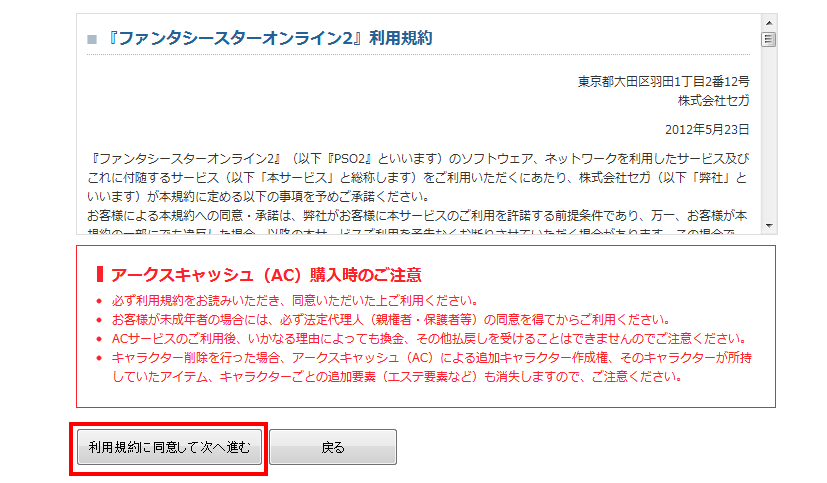
You can select クレジットカード (Credit Card) and click the Agree to Terms button in blue.
クレジットカード番号 | Credit Card Number
氏名(カード名義人) | Cardholder Name
カード有効期限(月/年) | Card Expiration (Month/Year)
セキュリティコード | Security Code (CVV)
お支払用クレジットカードの登録/更新 | Save / Update Card Information
Check this box if you want to save your card for future purchases.
Press the blue button to confirm. If your credit card accepts the transaction, then congratulations!
[/tab]
[tab title="WebMoney Method"]
Webmoney Method
On the AC Purchase Page, you need to type in your SEGA ID, your Password, and solve the Hiragana Captcha. If you don't have a Japanese IME installed, you can type it in manually by copying and pasting from Lexilogos.
If you haven't entered a Japanese address, postal code, nor name, you will have to makeup a fake address. The site does say that entering false information could get your SEGA ID suspended, so do this at your own risk.
You don't really need to worry about the last option, just choose the top button to purchase Arks Cash.
Purchase Arks Cash Menu
Choose your Arks Cash amount and select the top option: Credit Card クレジットカード.
500 AC = 500 Yen = $6.29
1000 AC = 1000 Yen = $12.58
3000 AC = 3000 Yen = $37.75
5150 AC = 5000 Yen = $62.91
10300 AC = 10000 Yen = $125.83
Click the left button to Agree to the Usage Rules.
Japanese Information
Names and Postal Code
姓名を入力してください。Please enter your name.
Last Name: 瀬賀 First Name: 太郎
Enter your name using up to 8 full-width characters in these styles:
Hiragana(ひらがな).
Kanji (漢字).
Full-width alphanumeric characters (ABC) .
Full-width alphanumeric characters have a wider space. If you have a Japanese IME installed, select one of those three character choices.
In whatever style you choose to write your name, you will need to convert it into Katakana. If you want to use a Kanji name, you can search Google for Kanji names or try this website. Find two names in Kanji and take note of their English spelling. Copy and paste them into the above fields.
姓名をカタカナで入力してください。Please enter your name inKatakana.
Last Name: セガ First Name: タロウ
If you can't type in katakana, use Lexilogos to copy and paste for you. If you memorized the English spellings of the Kanji names, use lexilogos and push the letters that spell out your name. For example if 太郎 is Tarou in English, then you would choose Ta タ Ro ロ and U ウ to make タロウ. That is your Katakana name.
〒 Enter your postal code.
〒 123-4567
You can try entering random numbers or you can be crafty and try Google searching Japanese listings, but before you do that we need the location first.
Address and Telephone Number
住所を入力してください。Please Enter your Address.
住所:東京都新宿区XX町1-1
Ok notice how there's two circles before the 町 or in my example I chose two Xs? You can insert a neighborhood here. If you are looking for a postal code, you can Google search a listing exactly like this with quotation marks:
"東京都新宿区*町"
Find a random webpage and look at how it's filled in. On the same site or business, try to find a postal code 〒 and make it somewhat similar to it.
An example address could end up like "東京都新宿区須賀町" or "東京都新宿区信濃町." Then you'll need to add random numbers with dashes or copy it from a website listing. Basically it could be "東京都新宿区須賀町1-1"
電話番号を入力してください。(半角数字)
Tel:
Enter a random telephone number like in the example "03-1234-5678"
Gender
性別を選んでください。Enter your gender.
性別:男性 | 女性
The first selection is male, and the second is female. Click the left button at the bottom of the page to confirm.
Credit Card Information
Choose and Type in your:
クレジットカード種類 Drop Down for VISA, MasterCard, JCB, etc..
クレジットカード番号 Credit Card Number
セキュリティーコード CVV Code
When you type your credit card number don't use the full-width Japanese number system. Regular numbers are fine. (123456789)
Pick your expiration date, month first, then year. Below that you must type out your name on the card. Press the left button to confirm. On this same area there's a checkbox button that lets you save this credit card information for future use.
On the next page it will show you a confirmation of the information you just put in, choose the left button to continue.
Payment Successful!
購入処理が正常に終了いたしました。If your payment was successful.
入力されたクレジットカードで決済することができませんでした。 If your payment was unsuccessful.
If your purchase was unsuccessful there is not much I can do for you, you'll have to use an alternative payment method. Sites like Kanetrade sell WebMoney but at a higher price.