
As of 2024, there are 2 main ways to purchase Arks Cash (AC) in PSO2 Japan. The previous method with PSO2es no longer works due to Google Play restricting foreign purchases.
[tabs class="centered"]
[tab title="Credit Card Method" active="active"]
Credit Card Method

Sign in to the ARKS Cash Purchase page using your SEGA ID and Password, then fill out the Hiragana captcha. You can use Discord if you need help with the captcha.

Click the Buy AC button in blue.

You can select the AC amount you want at the top, and pick the payment method at the bottom.
You can select クレジットカード (Credit Card) and click the Agree to Terms button in blue.

- クレジットカード番号 | Credit Card Number
- 氏名(カード名義人) | Cardholder Name
- カード有効期限(月/年) | Card Expiration (Month/Year)
- セキュリティコード | Security Code (CVV)
- お支払用クレジットカードの登録/更新 | Save / Update Card Information
- Check this box if you want to save your card for future purchases.
Press the blue button to confirm. If your credit card accepts the transaction, then congratulations!
[/tab]
[tab title="WebMoney Method"]
Webmoney Method

On the AC Purchase Page, you need to type in your SEGA ID, your Password, and solve the Hiragana Captcha. If you don't have a Japanese IME installed, you can type it in manually by copying and pasting from Lexilogos.
If you haven't entered a Japanese address, postal code, nor name, you will have to makeup a fake address. The site does say that entering false information could get your SEGA ID suspended, so do this at your own risk.

You'll find three buttons:
- アークスキャッシュ(AC)購入 To Purchase Arks Cash
- 購入履歴 Purchase History #history
- クレジットカード情報 Credit Card Information
You don't really need to worry about the last option, just choose the top button to purchase Arks Cash.

Choose your Arks Cash amount and select the top option: Credit Card
クレジットカード.
- 500 AC = 500 Yen = $6.29
- 1000 AC = 1000 Yen = $12.58
- 3000 AC = 3000 Yen = $37.75
- 5150 AC = 5000 Yen = $62.91
- 10300 AC = 10000 Yen = $125.83
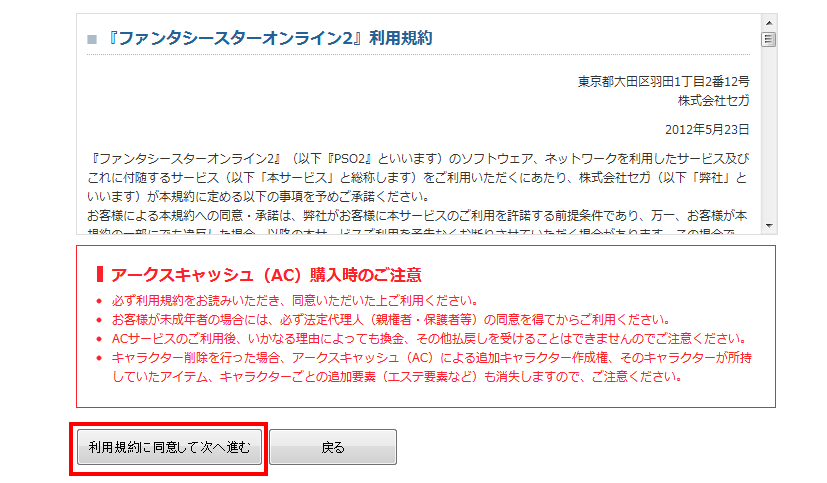
Click the left button to Agree to the Usage Rules.

Names and Postal Code
姓名を入力してください。Please enter your name.
- Last Name: 瀬賀 First Name: 太郎
Enter your name using up to 8 full-width characters in these styles:
- Hiragana(ひらがな).
- Kanji (漢字).
- Full-width alphanumeric characters (ABC) .
Full-width alphanumeric characters have a wider space. If you have a Japanese IME installed, select one of those three character choices.
In whatever style you choose to write your name, you will need to convert it into Katakana. If you want to use a Kanji name, you can search Google for Kanji names or try this website. Find two names in Kanji and take note of their English spelling. Copy and paste them into the above fields.
姓名をカタカナで入力してください。Please enter your name in Katakana.
- Last Name: セガ First Name: タロウ
If you can't type in katakana, use Lexilogos to copy and paste for you. If you memorized the English spellings of the Kanji names, use lexilogos and push the letters that spell out your name. For example if 太郎 is Tarou in English, then you would choose Ta タ Ro ロ and U ウ to make タロウ. That is your Katakana name.
〒 Enter your postal code.
- 〒 123-4567
You can try entering random numbers or you can be crafty and try Google searching Japanese listings, but before you do that we need the location first.

Address and Telephone Number
住所を入力してください。Please Enter your Address.
- 住所:東京都新宿区XX町1-1
Ok notice how there's two circles before the 町 or in my example I chose two Xs? You can insert a neighborhood here. If you are looking for a postal code, you can Google search a listing exactly like this with quotation marks:
"東京都新宿区*町"
Find a random webpage and look at how it's filled in. On the same site or business, try to find a postal code 〒 and make it somewhat similar to it.
An example address could end up like "東京都新宿区須賀町" or "東京都新宿区信濃町." Then you'll need to add random numbers with dashes or copy it from a website listing. Basically it could be "東京都新宿区須賀町1-1"
電話番号を入力してください。(半角数字)
- Tel:
Enter a random telephone number like in the example "03-1234-5678"

Gender
性別を選んでください。Enter your gender.
- 性別:男性 | 女性
The first selection is male, and the second is female. Click the left button at the bottom of the page to confirm.

Choose and Type in your:
- クレジットカード種類 Drop Down for VISA, MasterCard, JCB, etc..
- クレジットカード番号 Credit Card Number
- セキュリティーコード CVV Code
When you type your credit card number don't use the full-width Japanese number system. Regular numbers are fine. (123456789)

Pick your expiration date, month first, then year. Below that you must type out your name on the card. Press the left button to confirm. On this same area there's a checkbox button that lets you save this credit card information for future use.
On the next page it will show you a confirmation of the information you just put in, choose the left button to continue.

Payment Successful!
購入処理が正常に終了いたしました。If your payment was successful.
入力されたクレジットカードで決済することができませんでした。 If your payment was unsuccessful.
If your purchase was unsuccessful there is not much I can do for you, you'll have to use an alternative payment method. Sites like Kanetrade sell WebMoney but at a higher price.

Purchase History Page
[/tab]
[/tabs]
Ok so ive logged into the Sega website and clicked 1000 ac, i then chose webmoney as i bought a code from arks-layer, i have to put in a personal information input but it gives me errors all the time, please help me out and send me some information so i can put it in and buy the AC
literally all you have to do is google search a hotel in Osaka, or Ikebukuro. Put that as your address
google a hotel in Osaka, or Ikebukuro. Just put that as your address, shit you can even put their phone number if you want to.
I've been trying to do this for months now and every time, this error shows up
https://gyazo.com/0875f4fe7b23e74a4e8cdca89e1fe53e
I don't know what it is, can I get some help?
Is the AC system of PSO2es iOS still different from the android version?
Yes.
getting network crowded after putting bitcash code, does that mean im putting wrong code?
Im back on game and want to buy some Webmoney but sadly Sutocorp dont accept paypal anymore but only bankwire.. and i bought tons of webmoney there before 🙁
Where i can buy Webmoney on serious website with paypal or master card ?
Did anyone know please ? I have tons of old rare items to sold !!
Thank you !
I bought on CN USA by Paypal got the code very serious.
I suspect Sutocorp to have been hacked because i bought here before but now they accept only Bankwire and when i visited some days ago it have been changed for Bitcoins payment only.. very suspicious !
do i need to change the currency of my google wallet to yen?
Anyone know of any other methods?
Any recommended emulators to use?
Too many ghost stories about bluestacks
I just got it to work on pso2es. Link your card to your Google wallet and purchase through that menu. I have heard though, if you have used the card a bunch in the state's it will just get denied. My new visa check card worked just fine though. There is an es guide here on bumped. You should check it out
Thanks bumfight
Was wondering if anybody knew any alternate android emulators to use for PC as I dont trust my phone..
Or does this work in-place of it?
Going to try 2moro regardless; might have to suckitup n use bluestacks : (
Used NOX
seems nice n fine so far
incase anybody wanted an emulator
Do I need VPN for this? Or to log in to PSO2es?
I get that no one already cared about it and this place anymore, but just FYI that PSO2ES method no longer work due to June 2022 of Google Play changes